

Kurzanleitung Pandemie
Pandemie (Originalregel)
This guide is for players who already know how to play the game Pandemic. It only explains the game interface.
Game board
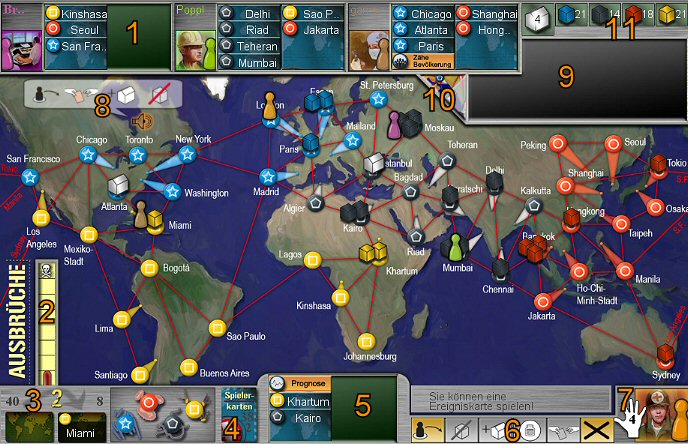
- Player (name, role, cards in play)
- Outbreak Marker
- Infection deck / discard pile (you can look through) and infection rate
- Player card discard (you can search through played cards)
- Players Cards
- Action bar
- Player's Role Card
- Game Announcements
- Operating window for the game chat
- Background Light (on/off)
- Available disease cubes/Research Labs
Action Toolbar
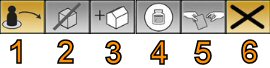
- Movement Action
- Treat disease
- Building a Research Station
- Discover a Cure
- Sharing knowledge
- Continue
Available actions are marked in yellow
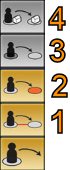
- Car/Ferry (moving to an adjacent city)
Direct Flight (flying) from a card in the player's hand)
Charter Flight (flying) to a card in the player's hand)
Shuttle Flight (Flying between White Research Stations)

The top icon means give a card, the middle icon means receive a card. Click on your desired icon to take this action. If a choice is available a menu will open with cards to select from.
Special Functions of the various Roles

The dispatcher therefore has an additional move option: he may move any pawn to another city containing another pawn.
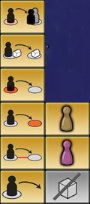
The Dispatcher clicks on the icons as usual to perform the desired movement action, then he selects the pawn that he wants to move.
Draw cards
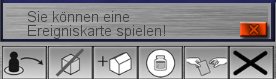
When drawing a card changes the state of play (drawing of an epidemic or an event card), players have the opportunity to play one of their event cards before the next phase of play.
To play an event card, simply click on the green check mark to accept it. If you do not want to play the card, you must click on the red X.
Game Options
Approval
If this option is activated, the dispatcher needs the consent of his teammates to move their pawns.
Level
This option determines the number of epidemic cards in the deck. For a startner/normal/hard/legend game then 4/5/6/7 epidemic cards are used. Winning the game scores 1/4/16/64 points, while a loss scores zero.
classic
Basic game without the expansion roles from "On The Brink".
Game Chat
An additional communication method is provided to make playing Pandemic more effective. You can use icons to make suggestionsThis makes proposals.
Main Communication - (German ONLY)

The main menu is located below the player information boxes. It is exposed by clicking on icon in the white speech bubble. This will then open a sub-menu. Each icon will open a different sub-menu.
Submenu - Movement
For all sub-menus: to return to the main menu, click on the green arrow. Your proposal is posted by clicking on the speaker icon. Your proposal will show now in the top right of the output window.
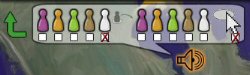
If you want to propose a specific pawn to move to a specific city, check the box below the corresponding pawn left check the box under the white arrow. Just click on the desired location.
To make a proposal to the dispatcher to bring 2 pawns together, check the box of the target pawn on the right (instead of the arrow).
Submenu - Treat Disease
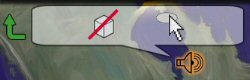
To make a proposal to tread a disease, highlight the target city and click on the speaker icon.
Submenu - Build a Research Lab
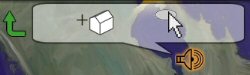
To make a proposal to build a research station, highlight the target city and click on the speaker icon
Submenu - Share Knowledge
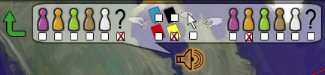
To suggest a proposal to "share knowledge", first click on the two pawns who will share (left is the giver, right is the receiver). Then choose the colour of the target card by checking the box below. You can therefore select a specific city by select the arrow.