Fanstuff

Darstellung
Darstellungs-Werkzeug öffnen

Durch Anklicken des Buttons "Darstellung" öffnet sich das Darstellungs-Werkzeug.
Schließen kann man dieses Fenster mit dem roten X oben rechts in der Ecke. Die Kontext-Hilfe erhält man durch Anklicken des blauen Fragezeichens daneben.
Mit der Werkzeug-Konfiguration kannst du die Werkzeuge in der Werkzeugleiste ein- bzw ausblenden.
Die verschiedenen Auflösungen
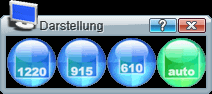
Sieht man dieses Werkzeug zum ersten Mal und klickt auf eines der drei Symbole mit den Zahlen, so ändert sich dementsprechend die Größe des Client. Das war ja einfach... ein Tool also, um die Dimensionen des Client schnell verstellen zu können. :-)
Dummerweise ist das aber weniger als die Hälfte der Wahrheit...
Die Wahrheit ist, daß dieses Tool eigentlich etwas ganz anderes macht. Nur wer versteht, was es eigentlich macht und wie sich das auswirkt, sollte dieses Tool verwenden. Für die allermeisten Benutzer ist es sinnvoll, den Darstellungsmodus immer auf "auto" stehen zu lassen und sich per prop-Datei Menu-Befehle oder Tastatur-Shortcuts zu definieren, mit denen man die Fenstergröße verändert.
Noch nicht abgeschreckt?... Ok, dann lies weiter...
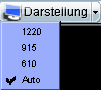
Alternativ erhält man durch einen Klick auf den Pfeil rechts neben dem Button die drei Einstellungen direkt in der Werkzeug-Leiste. Ein Klick auf eine Einstellung aktiviert diese.
Was macht dieses Tool denn nun wirklich?
Um das zu erklären müssen wir uns leider etwas in technische Details vertiefen. Das Zeichnen der grafischen Komponenten des Client ist ein zweistufiger Prozess: in einem ersten Schritt zeichnet der Client die grafische Ansicht auf ein internes Zeichenbrett. Danach wird in einem zweiten Schritt diese Zeichnung auf die aktuelle Größe des Client skaliert:
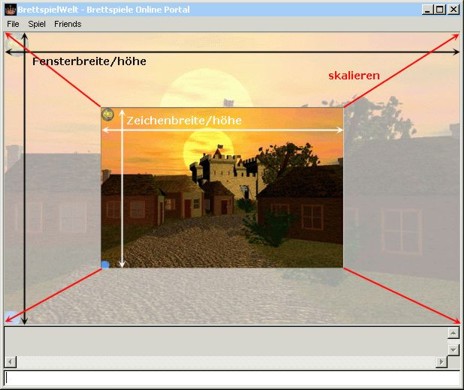
Die primäre Aufgabe des Darstellungs-Werkzeugs ist die Vorgabe der Zeichenbreite und nicht die Vorgabe der Fensterbreite!
Warum wird dann aber die Fensterbreite verändert, wenn man eines der drei Zahlsymbole des Werkzeugs anklickt? Die Skalierung hat zwei unangenehme Nebeneffekte, wenn sie keine triviale Skalierung im Verhältnis 1:1 (d.h. Zeichenbreite und Fensterbreite sind identisch) ist: sie kostet viel Rechenzeit und die Bildqualität leidet dabei sichtbar. Wählt der Benutzer eine feste Zeichenbreite, so geht der Client zuerst einmal davon aus, dass eine identische Fensterbreite Sinn macht und verändert das Fenster dementsprechend. Nichtsdestotrotz kann der Benutzer hinterher seine Fenstergröße durch Ziehen an den Rändern des Client verändern, ohne damit die Zeichengröße zu beeinflussen, wenn er sie auf einen festen Wert gesetzt hat.
Die Funktion der ersten drei Symbole im Werkzeug ist nun einfach zu erklären: sie setzen die Größe des Zeichenbereichs auf Bereiche von jeweils 1220 x 784, 915 x 588 bzw. 610 x 392 Pixel.
In der Einstellung "auto" wählt der Client selbst den optimalen Zeichnungsmodus: wir erinnern uns, dass bei Skalierungen die Bildqualität umso mehr leidet, je stärker skaliert werden muss. Wenn die aktuelle Ansicht Zeichnen in beliebigen Auflösungen unterstützt (Spiele der Carcassonne-Familie können das zum Beispiel), dann wird immer in der aktuellen Fenstergröße gezeichnet. Ansonsten wird für die Zeichnung die höchste Auflösung gewählt, die kleiner als die Fenstergröße ist. Die Einstellung "auto" ist die Voreinstellung, wenn der Benutzer nichts anderes wählt.
Warum kann man die Zeichnungsgröße dann überhaupt auswählen?
Wer sehschwach ist, ist eventuell auf die vergrößernde Skalierung angewiesen, um Spielelemente richtig erkennen zu können. In diesem Fall macht es für den Benutzer Sinn, eine Breite von 610 oder 915 Pixel fest vorzuwählen und danach das Fenster auf eine größere Breite zu ziehen.
Was hat das für Konsequenzen? Tipps zum Umgang mit dem Tool
Im Normalfall ist die Einstellung "auto" immer die beste. Es ist zwar verlockend, die Fenstergröße mit Hilfe dieses Tools schnell auf einen anderen Wert einzustellen, aber dadurch wird der Client daran gehindert, beim Wechsel in einen anderen Raum oder beim Verändern der Fenstergröße wieder selbst den optimalen Zeichnungsmodus zu bestimmen.
Anstatt Fenstergrößen mit Hilfe des Darstellungstools zu verändern, ist es zur Wahl verschiedener Größen besser, sich entsprechende /setsize-Befehle mit Hilfe der prop-Datei auf Funktionstasten zu legen oder sie als Menü-Einträge zu definieren. Dabei ist zu beachten, dass die Breite nach Möglichkeit einem der drei Werte 610, 915 oder 1220 entspricht. Dies vermeidet (bei den neueren Spielen, die diese Zeichnungsbreiten unterstützen) eine Skalierung mit Rechenaufwand und suboptimaler Qualität der Darstellung.